New Governed AI for UK schools

Intelligence schools can trust, even in critical moments.
A secure, governed AI platform that keeps your data safe, supports staff day to day, and delivers instant whole-school alerts when it matters most. Included in every Atom IT school package.
- Built to reduce workload
- Supports inclusion
- Works inside Microsoft 365
- Never trains public AI models
What's our policy on phones in lessons?
Activity adapted
SEN and EAL support for this group
AI feedback
Grade 7Strong use of evidence. Develop your conclusion further.
All staff · Whole school
LOCKDOWN
Delivered to every screen
Governed by design
Works within your school's Microsoft 365 environment, using strict data controls and anonymised identifiers to protect sensitive information.
Useful for the school day
Staff query policies and handbooks with confidence. Teachers create lesson plans, classroom images and personalised SEN and EAL activities.
Ready when it matters
AtomX Alerts, our whole-school lockdown alert product, is embedded in Atomas for immediate, reliable communication across every classroom.
See it in action
One platform. Every part of the school day.
Click through the tabs to see how staff use Atomas for policy questions, lesson planning, SEN and EAL support, marking and whole-school alerts.
What's our policy on phones in lessons?
Dyslexia · EAL (Polish)
- ✓Visual task schedule
- ✓Chunked instructions
- ✓Movement breaks
- ✓Dyslexia-friendly worksheet
Key vocabulary
- leaf
- liść
- sunlight
- światło słoneczne
- chlorophyll
- chlorofil
Mark this essay with our English Literature rubric
AI feedback
Strong use of evidence. Develop your conclusion further by linking back to the writer's intent.
Grade
7
AtomX Alerts · Leadership
Lockdown initiated
Lockdown in progress. Follow the lockdown procedure, secure your room and await further instruction.
Delivered
All staff
Shown on
Every classroom & staff screen, plus a paging broadcast to every phone
Acknowledged
Tools for every part of the school day
Less time planning. More time teaching.
Built for UK primaries, secondaries and MATs on Microsoft 365, for teachers, SENCOs, EAL coordinators and the IT teams who look after them.
AI lesson planning
Curriculum-aligned plans, activities and quizzes by subject and year group.
Policy-aware chat
Staff ask about policies and handbooks and get answers grounded in your documents.
EAL assistant
Interactive EAL lessons with vocabulary, translations and culturally appropriate content.
SEN activities
Personalised activities and week-long plans built from individual pupil profiles.
Assessment & marking
Consistent feedback using your own marking rubrics from Atomas Notebook.
Image creation
Custom classroom visuals from multiple AI image models, with video on request.
Lockdown & alerts
AtomX Alerts, our separate lockdown and alert product, embedded right inside Atomas.
Export to Microsoft 365
Send work to Word, PowerPoint, PDF and OneNote, saved straight to OneDrive.
AtomX Alerts · Whole-school alerts
One tap. Every screen, every classroom.
When seconds count, leadership can broadcast an alert from the AtomX Alerts site alert centre. AtomX Alerts is our separate alerting product, embedded in Atomas so it sits alongside the tools staff already use. It goes to every subscribed classroom and staff device at once, full screen, with its own colour and sound, so nobody misses it and nobody has to guess what it means.
- Full lockdownFull screen red, with a siren
- Partial lockdownMove indoors, lock perimeter doors
- Shelter in placeDark blue, with a soft chime
- MedicalDesignated responders to location
- Animal looseStay indoors and keep clear
- Custom alertYour own wording, no siren
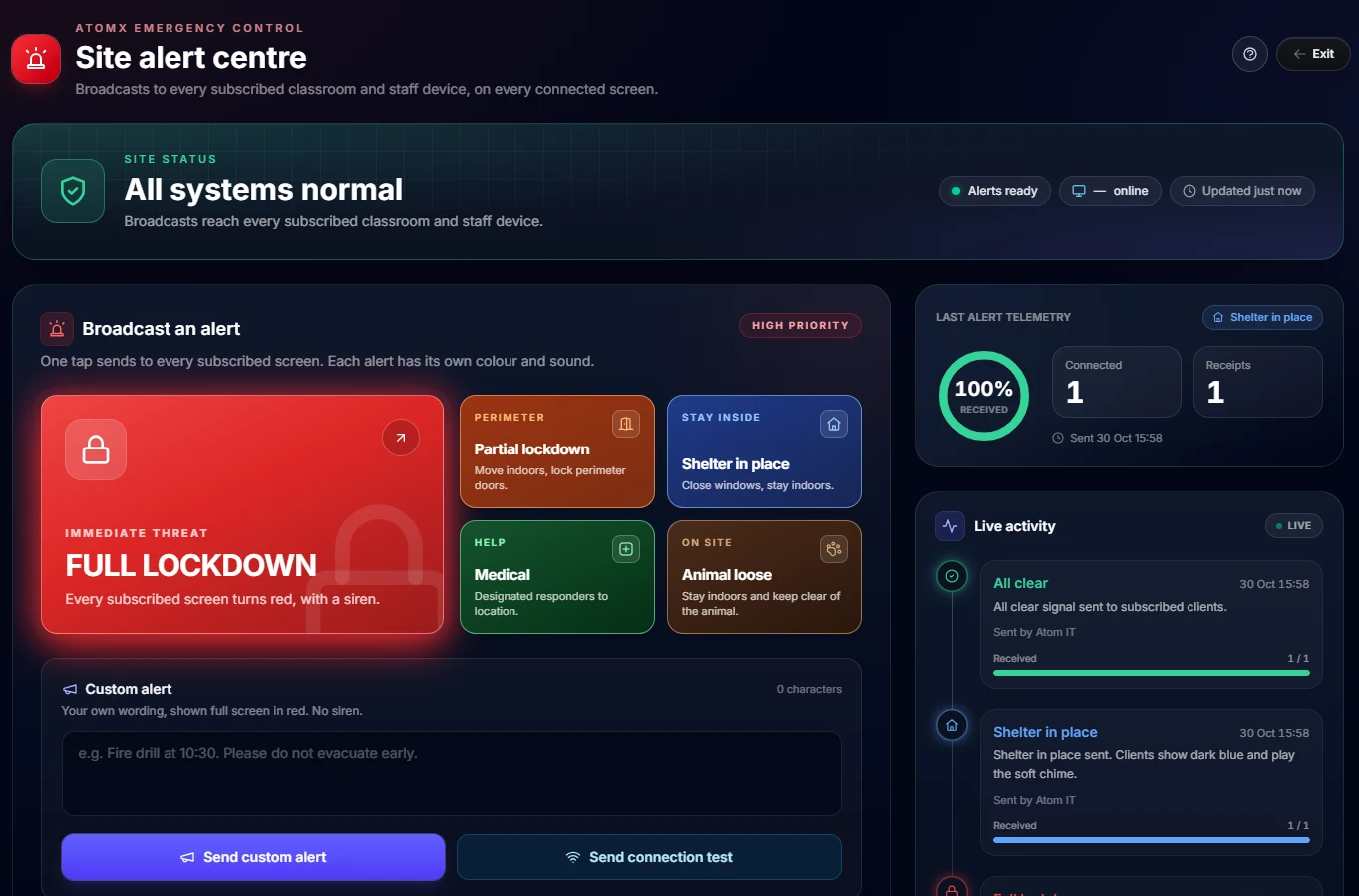
Every connected screen
Classroom displays and staff devices that subscribe to your site all receive the alert.
Delivery receipts
Live telemetry shows how many screens are connected and how many have received each alert.
Activity log
Every alert and all-clear is recorded with who sent it, when, and how many screens received it.
Connection tests
Send a test at any time to check every screen is subscribed and online before you need it.
Even louder on our phone platform
Every alert, paged to every handset.
Schools on our own hosted Yeastar phone system get AtomX Alerts delivered as paging broadcasts too, so the same lockdown is heard through every desk phone as well as seen on every screen.
AI isn't an add-on. It's infrastructure.
One school IT package. AI included.
We've built Atomas directly into our core school IT support packages, alongside network, device and cyber security management. One unified, cost-effective platform your school can depend on, supported by the same team.
One supplier, one support team. No extra contracts or disconnected AI apps.
Governed by design
Safe by default. Ready when it matters.
-
Inside your tenant
Works within your school's existing Microsoft 365 environment.
-
Strict data controls
Anonymised identifiers protect sensitive information.
-
Your data stays yours
Student data is never used to train public AI models.
-
Critical moments covered
AtomX Alerts for whole-school lockdowns, embedded in Atomas.
Questions about Atomas? Email atomas@atomit.co.uk
Notebook RAG
Ground your AI in your school's knowledge.
Retrieval-augmented generation lets Atomas reference your own curriculum documents, marking schemes and policies. Instead of relying on general knowledge, it looks up your school's materials, so every lesson, activity and answer meets your exact standards.
-
01 Upload
Add curriculum documents, marking schemes and policies to Atomas Notebook.
-
02 Index
Your materials are securely processed and indexed.
-
03 Ground
When staff create content or ask a question, Atomas retrieves the most relevant sections and builds every response on them.
Accuracy & alignment
Lessons match your exact curriculum standards, learning objectives and progression pathways. No generic content.
Consistency
Everything uses your school's established approach, terminology, teaching methods and frameworks.
Compliance
Responses follow your safeguarding, inclusion and educational policies, so recommendations meet your standards.
Reduced errors
No reliance on outdated general knowledge. Atomas references only your current, verified documents.
Personalisation
Content is tailored to your curriculum, marking schemes and assessment criteria.
Trust & reliability
Staff can trust answers because they're based on documents your team has verified and approved.
Built for the whole school
Something for everyone on staff.
Atomas is built for UK primary and secondary schools and MATs on Microsoft 365.
Teachers
Curriculum-aligned lesson plans, quizzes, slide decks and classroom images, plus marking with your own rubrics.
SENCOs & inclusion leads
Personalised SEN activities and week-long plans built from individual pupil profiles.
EAL coordinators
Interactive EAL lessons with vocabulary, translations and culturally appropriate content.
Leadership
Policy-aware answers for staff, leadership tools and one-tap whole-school alerts.
IT teams
Governed AI inside your tenant boundaries, with Microsoft 365, SharePoint and OneDrive integration.
How to get access
Up and running in three steps.
Already an Atom IT school? Atomas is part of your package. We'll register your domain and configure Microsoft 365 for you.
For schools
- 1 Contact your school's IT administrator, or Atom IT
- 2 Request Microsoft 365 integration setup
- 3 Get your school domain registered
For teachers
- 1 Use your school Microsoft 365 account
- 2 Sign in with your school email
- 3 Start creating lessons straight away
Is Atomas safe for student data and GDPR?
Atomas is designed for governed use in UK schools. It works within your Microsoft 365 environment with strict data controls and anonymised identifiers. Student data is not used to train public AI models.
Does Atomas work with Microsoft 365?
Yes. Atomas integrates with Microsoft 365, SharePoint and OneDrive. Staff sign in with their school account, and exports can be saved to familiar Microsoft tools like Word, PowerPoint and OneNote.
What can teachers use Atomas for day to day?
Teachers use Atomas for AI lesson plans, quizzes, slide decks, SEN activities, interactive EAL lessons, image creation, policy-aware staff chat and schoolwork marking, grounded in your school's Notebook documents where configured.
How does Atomas Notebook ground AI in our policies?
Upload curriculum documents, marking rubrics and policies to Atomas Notebook. When staff create lessons or ask questions, the AI retrieves the relevant sections from your materials, so answers align with your safeguarding, inclusion and curriculum standards.
What is AtomX Alerts?
AtomX Alerts is our whole-school alert and lockdown product. It is a separate product from Atomas, but it is embedded in the Atomas system, so leadership can reach every subscribed classroom and staff screen quickly from the same place staff already use for day-to-day AI tools. Schools on Atom IT's hosted Yeastar phone system also get every alert delivered as a paging broadcast to their handsets.
How do UK schools get access to Atomas?
Schools typically onboard through their IT administrator or Atom IT Solutions. Your school domain is registered, Microsoft 365 integration is configured, and staff then sign in with their school email. Atomas is included in every Atom IT school IT support package.
Take control of your AI infrastructure
Book a demo for your school.
For head teachers, SLT and IT administrators. See how governed AI fits inside your Microsoft 365 tenant: lesson tools, Notebook RAG, inclusion support and whole-school alerts.
Explore the full Atomas website.
Product tours, the complete toolset and staff sign-in for schools that are already onboarded.
Visit atomas.ai