
Serverless pull printing
Users submit jobs from workstations or mobile clients into a secure cloud queue; documents stay unavailable until they authenticate and release at an authorised printer or MFP.
Cloud print
For schools and businesses moving away from print servers, Atom IT uses OptimiDoc Cloud for cloud print in our cloud-managed environments—driverless pull printing, secure release and scan-to-cloud workflows wired into the Microsoft 365 identities you already use. Cloud print is a central part of how we design serverless sites, not an optional add-on tacked on at the end.


Cloud-managed environments
When we build a cloud-first school or SME estate—Microsoft 365, Intune-managed devices and no on-site print servers—OptimiDoc Cloud is the platform we use for printing and document capture. It is a standing part of our managed environment design, alongside identity, backup and security.
What your staff can do on day one depends on how we scope and configure your deployment. The capabilities below describe OptimiDoc as a vendor platform; your Atom package and device mix determine which options are switched on for your site.
See our cloud services overview for how print fits alongside migration, Microsoft 365 and ongoing support.
OptimiDoc Cloud today
Based on OptimiDoc’s public cloud documentation and product pages—not every feature is enabled in every Atom deployment.
Users submit jobs from workstations or mobile clients into a secure cloud queue; documents stay unavailable until they authenticate and release at an authorised printer or MFP.
OptimiDoc Cloud uses Internet Printing Protocol rather than per-model drivers on each PC, with support for finishing options where the device exposes them.
Release at the device using card, PIN, mobile app, user list or SSO—including Microsoft 365 sign-in where we integrate it for your organisation.
Scan from supported multifunction devices, mobile apps or web upload; vendor documentation describes OCR to searchable PDF, customisable workflows and routing to cloud storage destinations.
Users can submit jobs in one location and release on a device connected to OptimiDoc Cloud elsewhere on your estate—subject to your policies and licensing.
Pull print & identity
OptimiDoc Cloud keeps configuration and job processing in the cloud, which suits organisations standardising on Microsoft 365 and reducing on-premises infrastructure.
We map release and queue policies to your sites and staff roles. Native badge release works on compatible devices; where needed we can extend release using external readers as part of your design.
OptimiDoc vendor marketing graphic—not a screenshot of your school or business tenant.
Document capture
OptimiDoc’s OptimiCapture product (described on optimidoc.com) supports scanning from MFP panels, mobile capture and web upload. Vendor materials describe OCR for searchable PDFs, configurable scan processes and delivery to cloud storage and business systems.
In education deployments, scan-to-OneDrive with SSO is a documented use case (for example the University of Nottingham case study on optimidoc.com). Your destinations, retention and access rules remain your policies—we help implement workflows that match them.
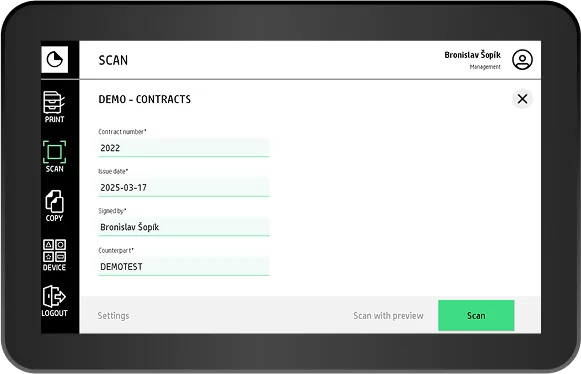
Vendor product illustration from optimidoc.com—not Atom customer imagery.
Atom IT uses OptimiDoc Cloud for cloud print and capture in the cloud-managed environments we support for schools and SMEs. It replaces traditional print servers while fitting Microsoft 365–centric estates we already support.
OptimiDoc Cloud is designed for serverless printing—the platform hosts queues and processing in the cloud. We assess any legacy on-premises queues as part of your migration plan.
Typically via Microsoft 365 SSO, card, PIN or the OptimiDoc mobile app at a supported device, depending on how we configure your site. Jobs stay in a personal pull queue until released.
OptimiCapture scanning is part of the OptimiDoc product family. Whether mobile, MFP and workflow features are enabled for you depends on your Atom scope, devices and licensing—not every module is on by default.
Native badge release applies to compatible devices. Other models may use alternative release methods (for example mobile app or external readers) as part of your agreed design—ask us what fits your fleet.
Free for schools, trusts & businesses
We'll review your devices, networks, filtering, backups and cyber security, benchmarked against the DfE digital and technology standards for schools, then show you exactly where things can be simpler, safer and cheaper.